Design documents.Connect your data.Generate anywhere.
Design data-driven templates visually, connect them to your business databases, even behind your firewall, and generate production-ready PDFs and labels through one API.
14-day free trial, no payment details. Then a license for your organization.
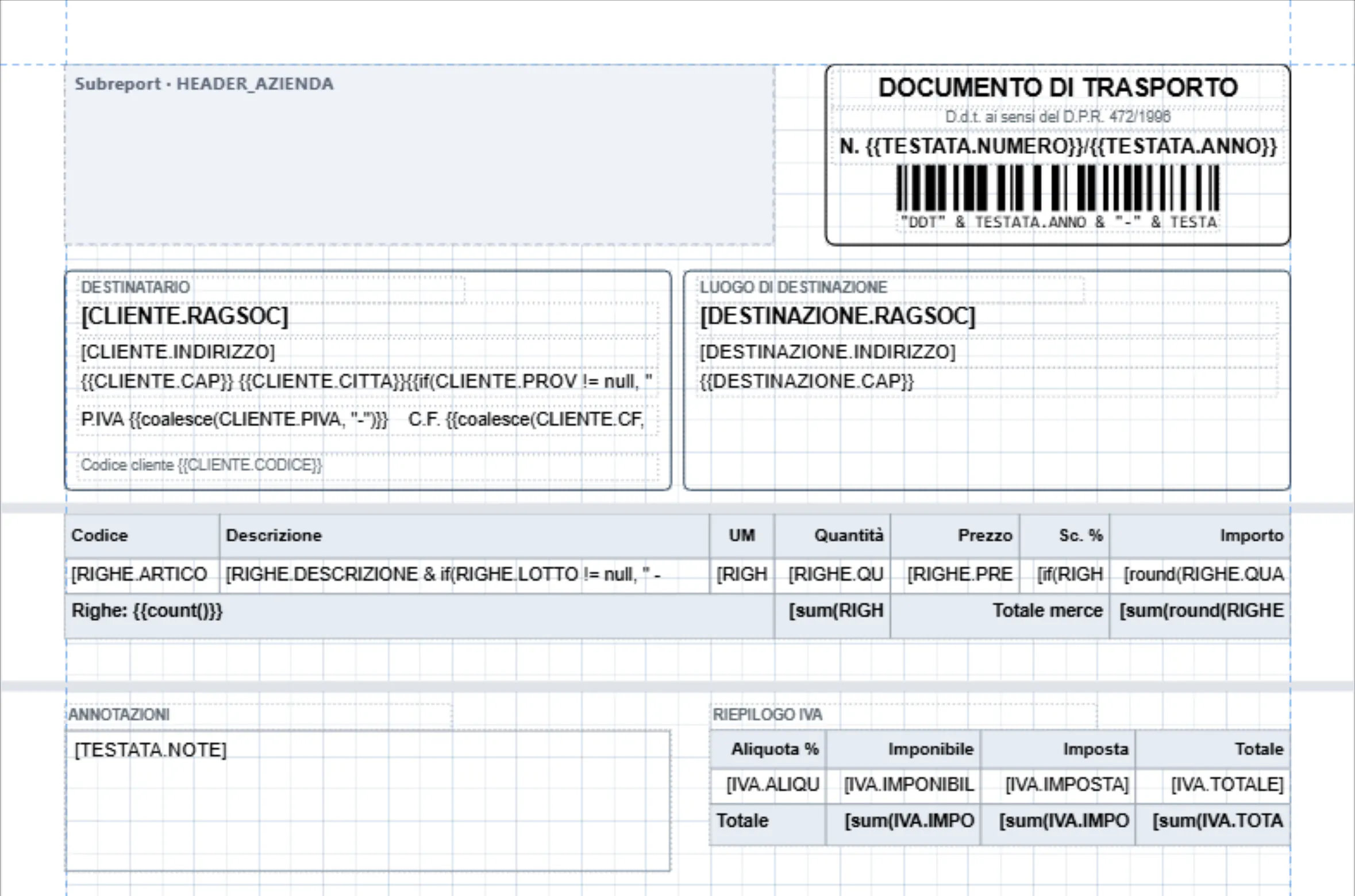
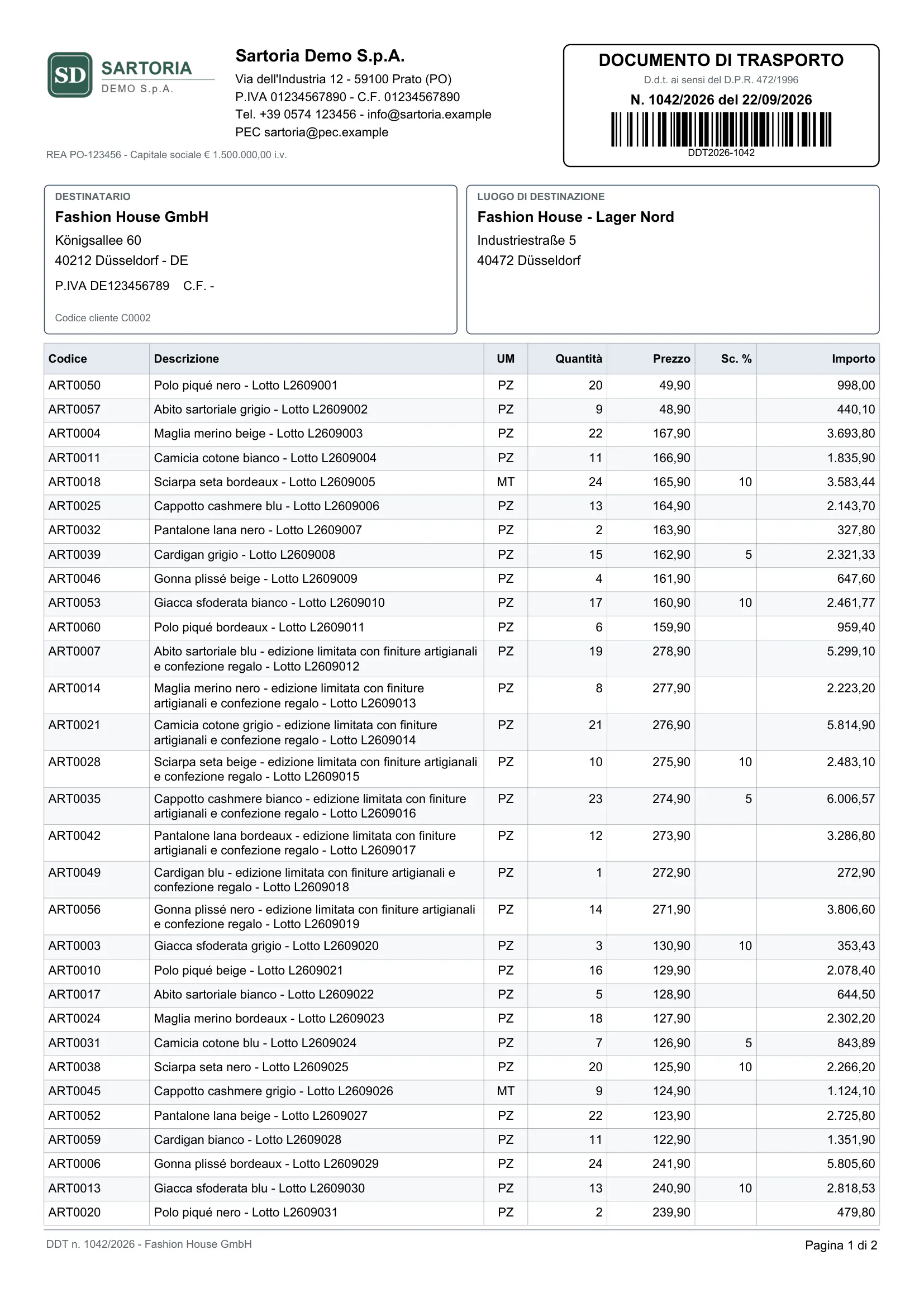
- Hosting
- Fully managed
- Hosted in the EU. Nothing to install or upgrade.
- Data sources
- Oracle first
- PostgreSQL too; more databases and REST coming.
- Private databases
- Outbound-only Gateway
- No inbound ports; credentials only your Gateway can read.
- Rendering
- POST /v1/render
- One authenticated call per PDF or ZPL label.
Why Prynt
Documents shouldn't ship with your release cycle.
Invoices, delivery notes and labels are where business software meets customers, carriers and auditors. Prynt moves them out of your code into versioned templates, rendered by one API call.
Without Prynt
With Prynt
- Changing a layout
- Without Prynt: A code change, a review and a release of the application for a moved field or a new logo.
- With Prynt: Edit the template in the Designer, publish a new version, promote it. The application does not change.
- Reading the data
- Without Prynt: Queries and mapping code rewritten in every service that prints something.
- With Prynt: SQL datasets with bind parameters, tested in the built-in IDE, read-only by design.
- Private databases
- Without Prynt: Inbound firewall rules, VPNs or a copy of the data in the cloud.
- With Prynt: The Prynt Gateway connects out on port 443: nothing to open, credentials only it can read.
- Labels for thermal printers
- Without Prynt: Hand-written ZPL strings, tested by printing until they look right.
- With Prynt: Labels designed in millimetres or dots, with a live preview drawn by the engine.
- Per-customer variants
- Without Prynt: Forked templates and report files nobody dares to touch.
- With Prynt: Versioned templates, drafts and rollbacks, per environment: development, staging, production.
- Knowing what happened
- Without Prynt: A PDF library deep in the code and no trace of who printed what.
- With Prynt: Every render logged with parameters, timing and correlation ID; changes in the audit log.
How it works
From database to document in four steps.
One workflow for every document type. Developers own the data and the integration, designers own the layout, and nobody waits for a release.
- 01Developer or IT
Developer or IT
Connect
Register the Oracle or PostgreSQL databases your software already uses: directly over TLS, or through the Gateway when they are private. Read-only, always.
- 02Developer or designer
Developer or designer
Design
Write the dataset's SQL in the built-in IDE, then lay out pages and labels on the canvas. Drag a column onto the page and the field is bound.
- 03Template owner
Template owner
Publish
Validate and publish an immutable version. Promote it from development to staging to production, or roll back in one click.
- 04Your systems
Your systems
Generate
Call one endpoint, synchronously or as an async job, from any language or with the SDKs. Webhooks tell your systems when a document is ready.
Product tour
The real application, not a mockup.
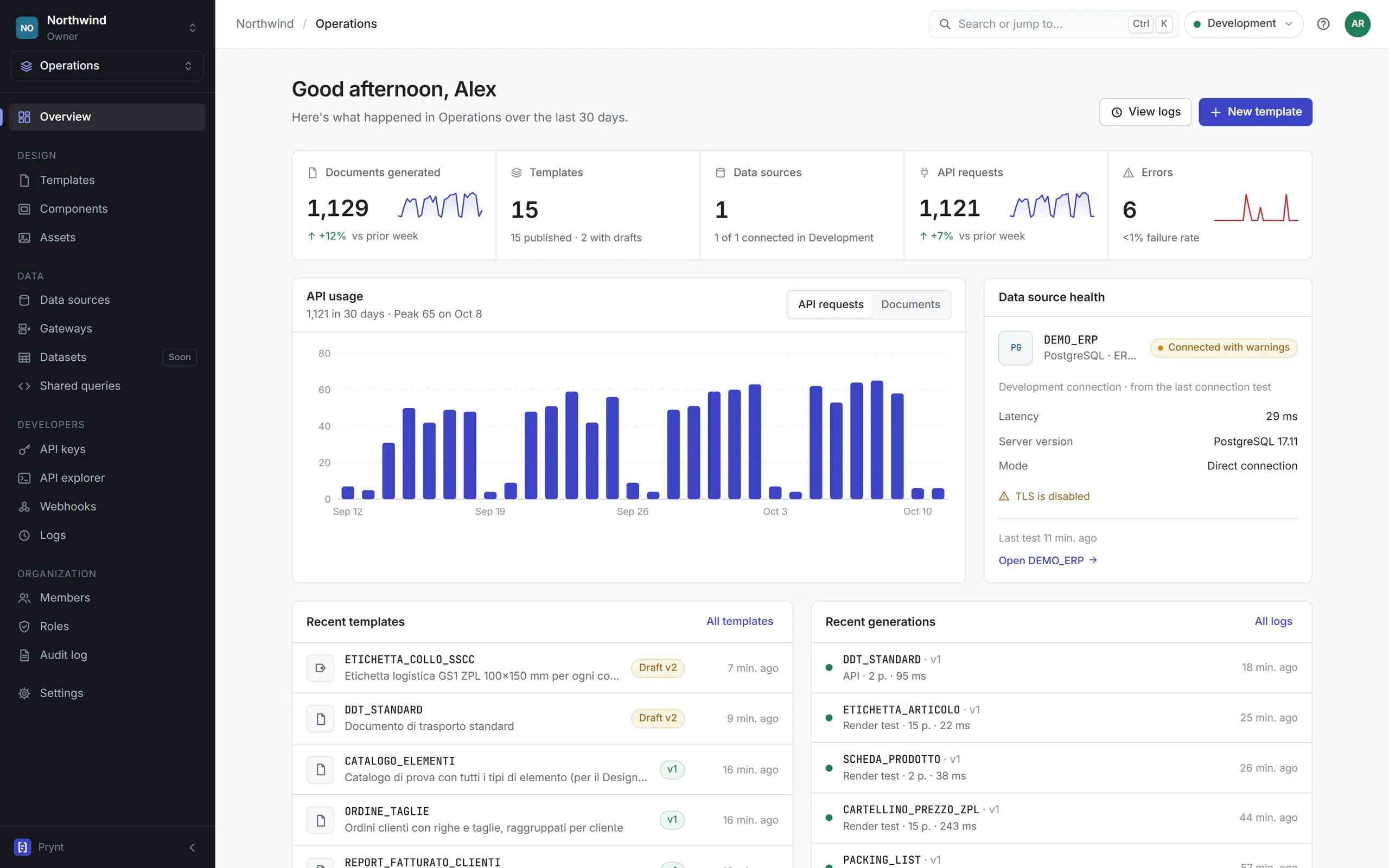
Captures of Prynt with a demo workspace: the Designer, labels, data, the API and monitoring. What you see is what you sign in to.
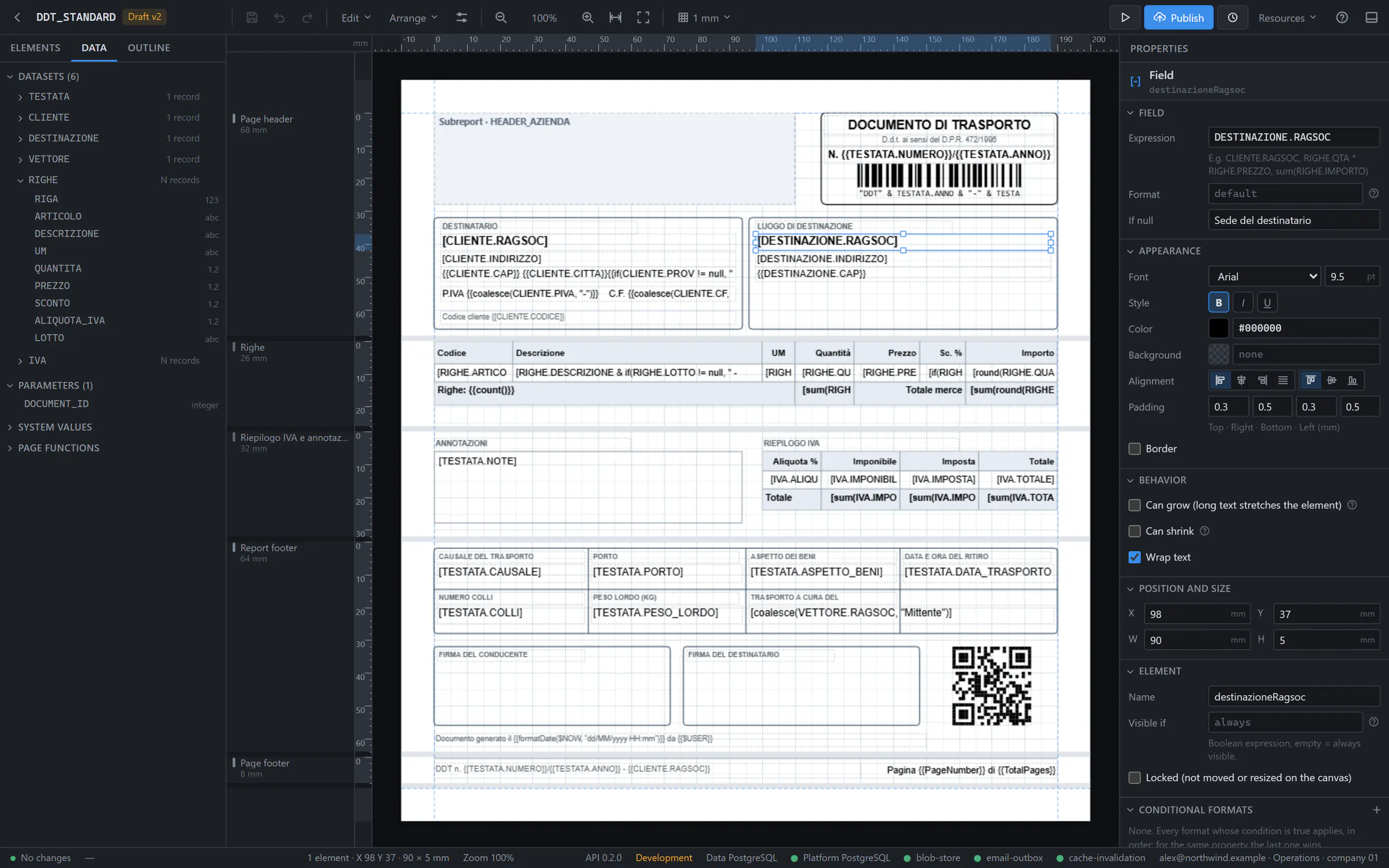
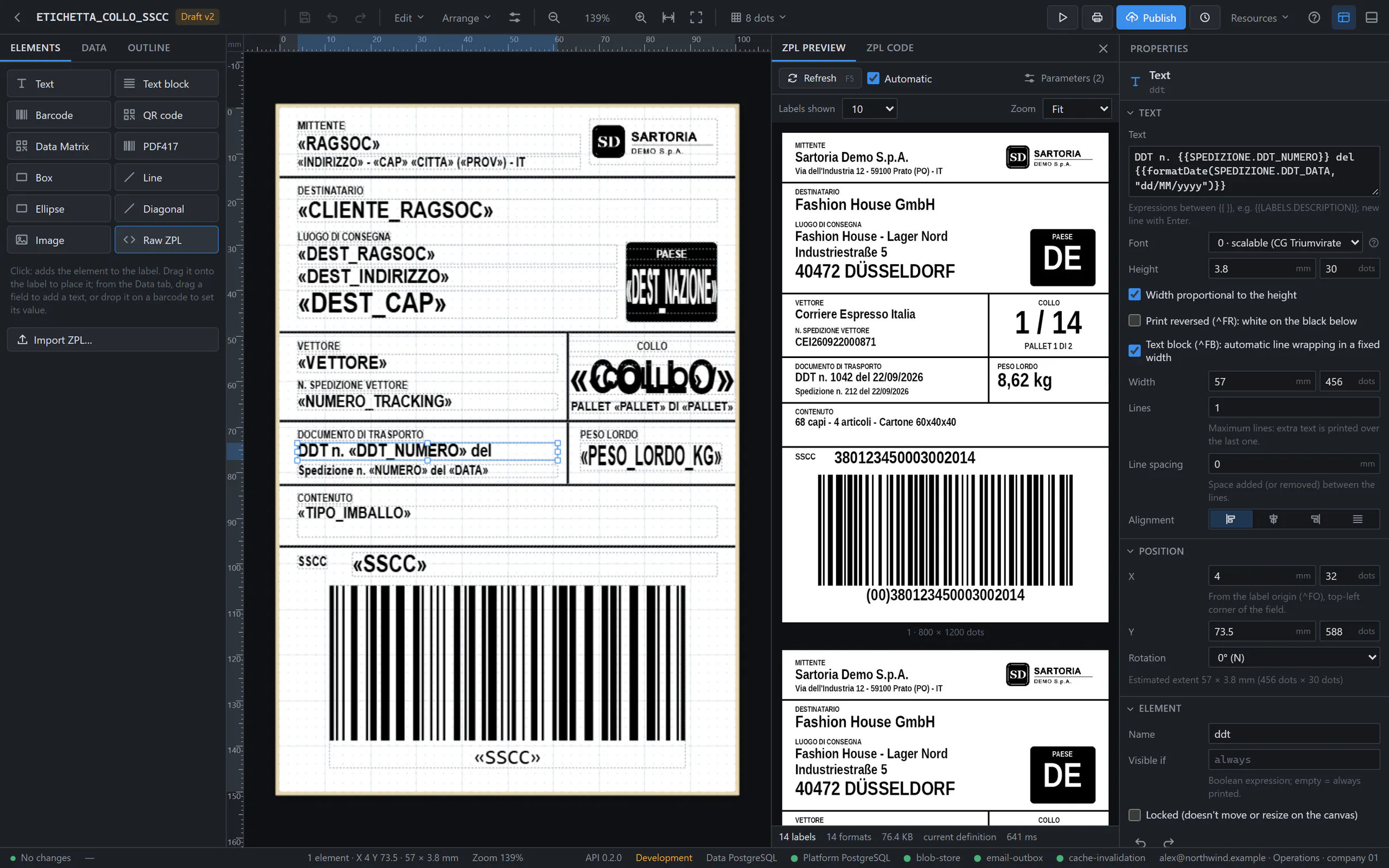
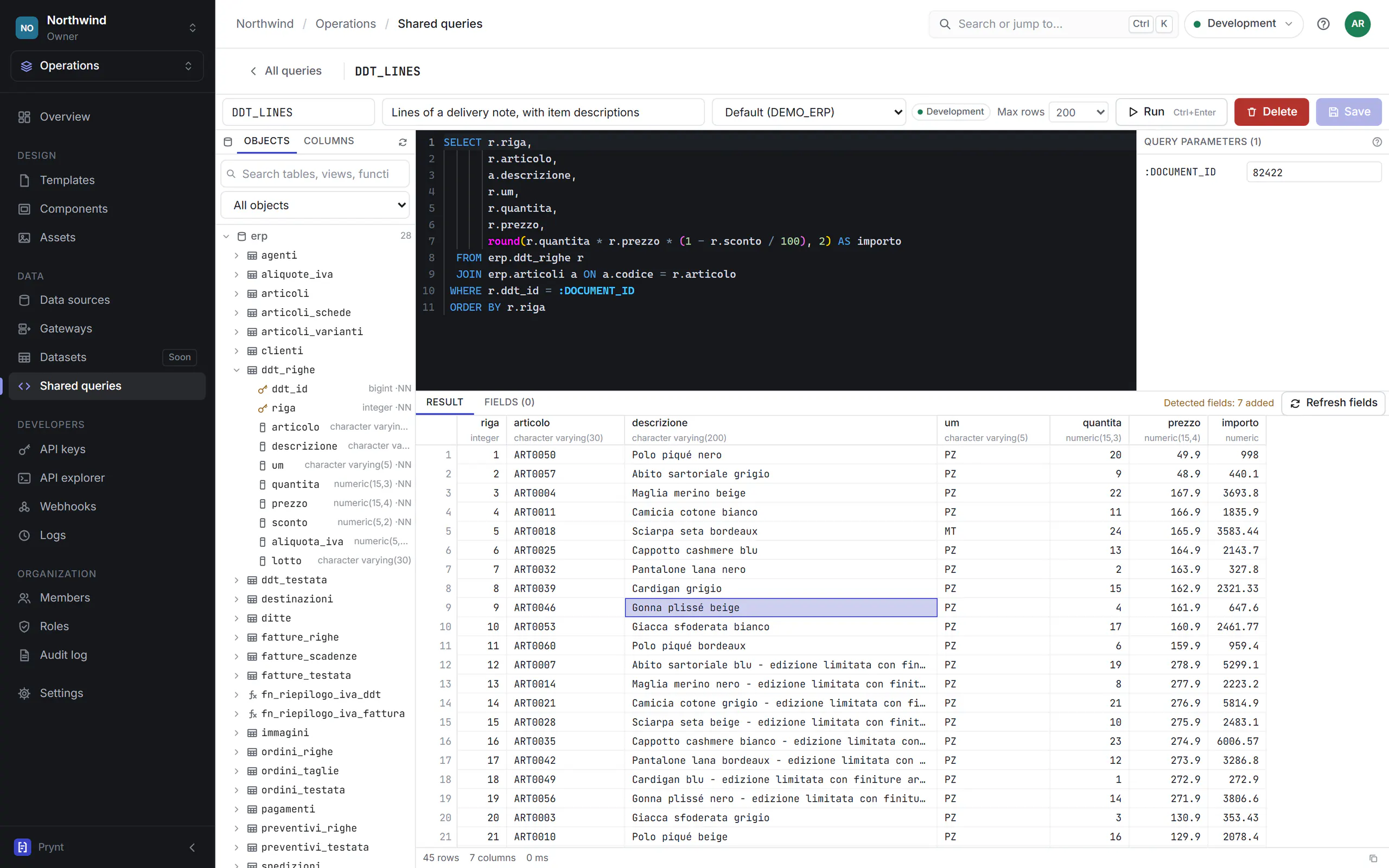
A precise canvas for business documents
Bands, tables, groups and conditions on real page sizes, measured in millimetres. Datasets sit beside the page: drag a field and it is bound.
- 1
Datasets and fields
Every dataset of the template with its fields and parameters, ready to drag onto a band.
- 2
Bound fields
Fields show the column they print, in data brackets; expressions and aggregates too.
- 3
Properties
Formats, null values, fonts, borders, grow and shrink, visibility conditions.
- 4
Bands
Page and report headers and footers, detail regions that repeat for every row.
Features
Everything a business document needs.
A complete toolchain, from the SQL that reads the data to the bytes of the PDF, built for documents that have to be right every time.
Visual Designer
A precise canvas with bands, rulers, guides and snapping. Real page sizes, measured in millimetres.
SQL data binding
Datasets from SQL or procedures with bind parameters. Drag a column onto the page and the field is bound.
Oracle first
Schema explorer, packages and procedures, REF CURSOR results. PostgreSQL is supported too.
Versioned templates
Editable drafts, immutable published versions, rollback and side-by-side comparison.
Environments
Development, staging and production, each with its own connections, versions and API keys.
Render API and SDKs
Synchronous renders or async jobs over REST, with clients for .NET and TypeScript.
Signed webhooks
document.generated and document.failed events, signed with HMAC-SHA256, retried and redeliverable.
PDF engine
Server-side rendering with embedded fonts, images and exact pagination. No headless browser involved.
ZPL and barcodes
Code 128, EAN, GS1-128, QR, Data Matrix and PDF417, in PDF documents and in ZPL labels.
Tables and conditions
Detail rows, groups, subtotals and repeating headers; sections shown or hidden by expressions.
Teams, roles and 2FA
Organizations, workspaces and roles for developers, designers and reviewers, with two-factor sign-in.
Audit and data control
Who published, rendered or changed permissions, when, with the correlation ID. Hosted in the EU.
Developers
One API call. One production‑ready document.
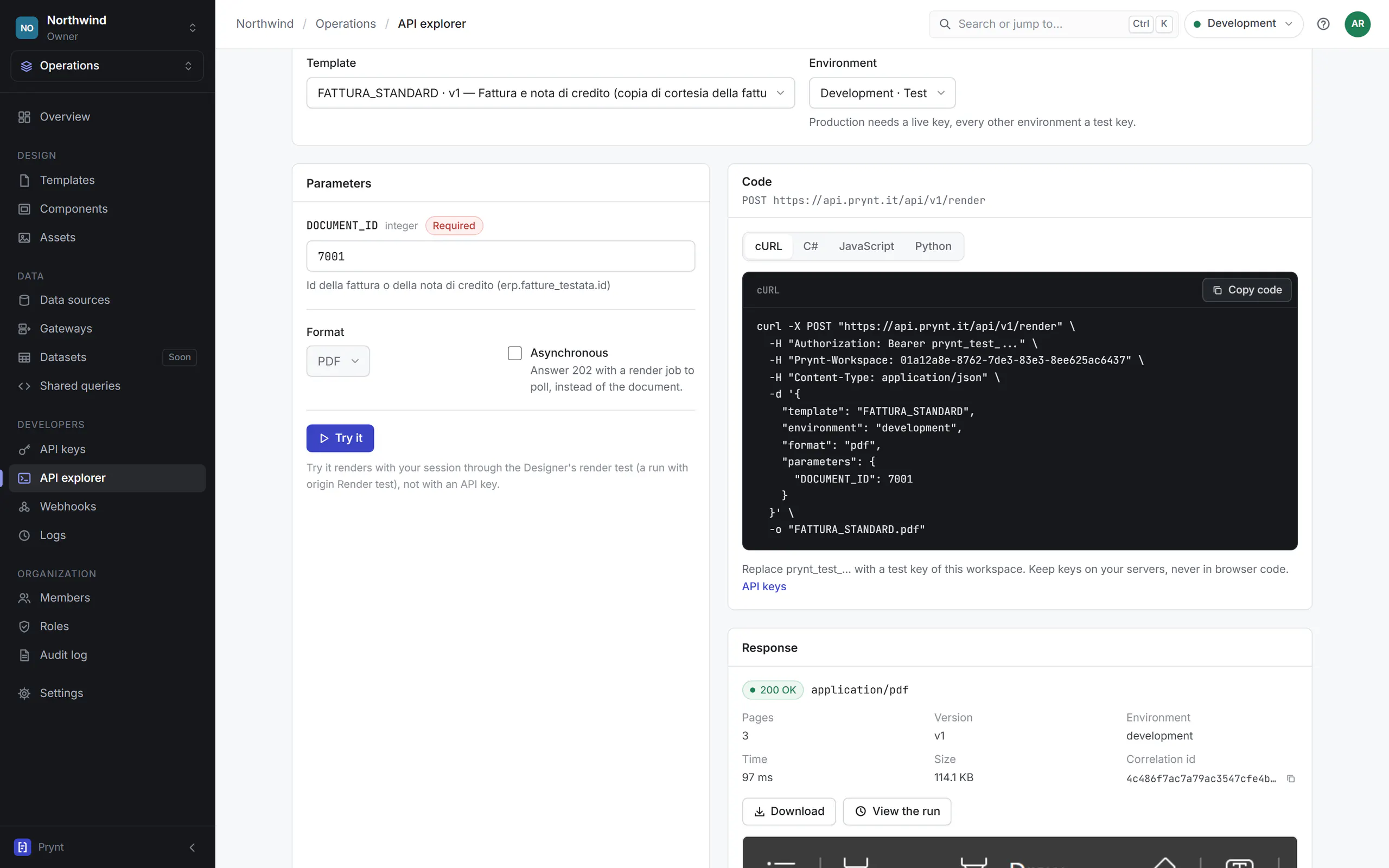
Publish a template once, then render it from any language, platform or job scheduler. Your code sends the template and its parameters; Prynt reads the data and returns the document.
- Sync or async
- Wait for the PDF in the response, or start a job and poll it.
- Signed webhooks
- document.generated and document.failed, HMAC-SHA256 signed.
- Scoped API keys
- Live and test keys per environment, revocable at once.
- Errors you can act on
- RFC 9457 problem details with errorCode and correlationId.
Not a developer? Prynt for companies
1curl -X POST https://api.prynt.it/api/v1/render \2 -H "Authorization: Bearer prynt_live_..." \3 -H "Content-Type: application/json" \4 -d '{5 "template": "DDT_STANDARD",6 "environment": "production",7 "parameters": { "DOCUMENT_ID": 82422 }8 }' \9 -o ddt-82422.pdf1HTTP/1.1 200 OK2Content-Type: application/pdf3Content-Length: 1168424Content-Disposition: attachment; filename="DDT_STANDARD_82422.pdf"5X-Correlation-ID: 4c486f7ac7a79ac3547cfe4b0e1d2a906X-Run-ID: 0199c2f1-5a7e-7b31-9c4d-2f0a8e6b1d23Data sources
Built for real business databases.
Connect Prynt to the databases your business software already uses. Oracle comes first, because that is where a large share of ERP data lives; PostgreSQL is supported too.
- Native Oracle access
- Tables, views and synonyms in the schema explorer; procedures, packages and REF CURSOR results as datasets.
- Bind variables as parameters
- Every :name in your SQL becomes a typed template parameter, validated before the query runs.
- Read-only by design
- Datasets only read, in read-only transactions with timeouts and row limits. The API never accepts SQL.
- One connection per environment
- Development, staging and production read their own databases, with their own credentials.
Data sources
northwind / operations
Oracle Database
ERP_PROD · production
- mode
- Gateway
- service
- ERP
- access
- read-only
- latency
- 4 ms
- PostgreSQLDatabaseAvailable
- SQL ServerDatabaseComing soon
- MySQLDatabaseComing soon
- REST APIsHTTP JSONComing soon

Security and the Gateway
Your database never has to be public.
Prynt is fully managed in the cloud. For databases on a private network, install the lightweight Prynt Gateway next to them: it connects out to Prynt, runs read-only queries locally and sends back only the results.
- The Gateway connects out to Prynt Cloud over TLS, on port 443.
- A render needs data: the request travels down the Gateway's own connection.
- The Gateway decrypts the credentials locally and runs the read-only SQL.
- Only the result rows go back. Prynt renders the document and discards them.
- Outbound only
- The Gateway opens a TLS connection out to Prynt on port 443. No inbound ports, no port forwarding, no VPN.
- Credentials sealed for your Gateway
- Your browser encrypts database credentials with the Gateway's public key. Prynt Cloud stores a blob it cannot decrypt.
- Read-only, always
- Only the SQL of your datasets runs, in read-only transactions with timeouts and row limits. The API never accepts SQL.
- Checked twice
- The Gateway repeats the read-only checks and enforces its own limits, so even a forged request cannot write.
- A key that stays on your server
- The Gateway signs in with a private key generated on your machine. Revoke it in Prynt and it is cut off at once.
- Every query audited
- User or API key, data source, environment, duration and rows for each query. Never the data values.
Ways to connect · always read-only
Prynt Gateway
RecommendedFor databases on-premise or in a private network. A lightweight service next to the database; the only thing you install.
Windows service · Linux · Docker
Direct connection
For databases already in the cloud: TLS with certificate verification, read-only credentials, private network ranges always blocked.
Oracle TCPS · PostgreSQL verify-full
Least privilege, guided
Prynt gives you the script for a read-only database user and warns you when the configured user could write.
read-only user · privilege warnings
Use cases
Every document your software produces.
Prynt is not an invoice generator. It is document infrastructure: the same designer, data binding and API for every page your business prints, sends or archives.
Built for software companies and ERP vendors who ship documents to many customers, for system integrators who deliver them, and for IT departments who keep them running.
ERP · billing
Invoices
Courtesy copies of e-invoices and credit notes, totals and VAT summaries computed from the data.
ERP · logistics
Delivery notes
Transport documents with signature areas, carrier details and barcodes for the warehouse.
WMS · carriers
Shipping labels
GS1 parcel labels with SSCC as ZPL straight to thermal printers, or as PDF.
ERP · sales
Orders and quotes
Purchase and sales orders, confirmations and quotes from the same data.
WMS · shipping
Packing lists
Per-parcel contents, weights and checks, grouped exactly as packed.
Quality · compliance
Certificates
Certificates of conformity and analysis, test results and approvals.
Finance
Statements
Account statements with running balances that span as many pages as needed.
Operations
Operational reports
Reports with groups, subtotals and charts, printed, emailed or archived.
Your product
Anything you print
If the data is in a database, the document is a template. Product sheets, price tags, forms.
Fully managed
One managed document service for all your systems.
Prynt runs the API, the render engine and your templates for you, in the European Union. Every application calls the same API, so a layout change reaches every system at once; only the optional Gateway runs on your side.
- Nothing to install
- Design in the browser, render through the API. No servers, no upgrades, no report runtime to maintain.
- Hosted in the EU
- The platform and the processing of your data run in the European Union, designed around the GDPR.
- Data not kept
- Rows read for a document are used to render it and then discarded; only the PDFs you choose to keep are stored.
- Isolated per organization
- Every workspace has its own data sources, credentials, API keys and audit trail.
Pricing
Plans for every stage, from first template to OEM.
One license per organization, fully managed in the EU. Try every feature free for 14 days, then request your license.
Developer
For developers evaluating Prynt and building a first integration.
Start a 14-day free trialLicense
14-day free trial, then a license key
- Visual Designer
- Oracle and PostgreSQL data sources
- Prynt Gateway for private databases
- REST render API
- Most teams
Business
For software companies and teams generating documents in production.
Start a 14-day free trialLicense
14-day free trial, then a license key
- Everything in Developer
- Development, staging and production
- Team workspaces and roles
- Audit log
Enterprise
For ERP vendors, integrators and organizations with strict security requirements.
Request a licenseCustom license
Volumes, terms and support for your organization
- Everything in Business
- Multiple Gateways for high availability
- Custom data retention
- Partner and OEM terms
FAQ
Questions, answered.
The short version of what teams ask before they connect their first database.
Something else? Read the documentation or contact us.
What exactly is Prynt?
A fully managed service for business documents. You design data-driven templates in the browser, bind them to your databases with SQL, publish versions and render PDFs and ZPL labels through a REST API. There is no server or report runtime for you to run.
Do we have to install anything?
No. The only optional component is the Prynt Gateway, a lightweight service you install next to databases that are not reachable from the internet. It connects out to Prynt over HTTPS, so no inbound port is opened.
Which databases can Prynt read?
Oracle first, including packages, procedures and REF CURSOR results, and PostgreSQL. SQL Server, MySQL and REST data sources are on the roadmap. Every query is read-only.
Can Prynt write to our database?
No. Only the SQL of your datasets runs, in read-only transactions with timeouts and row limits, and the API never accepts SQL. With the Gateway the read-only checks run a second time on your side. Prynt also gives you the script for a read-only database user.
Where is our data processed and stored?
In the European Union. Rows read from your databases are used to render the document and then discarded; only the documents you choose to keep are stored.
How do our systems call Prynt?
With one HTTPS call to POST /api/v1/render: synchronously, with the PDF in the response, or as an async job you poll or receive through a signed webhook. Official clients exist for .NET and TypeScript, and any language that speaks HTTP works.
Can designers change a layout without a release?
Yes. Templates are edited as drafts, validated and published as immutable versions, per environment. Your application keeps calling the same template code; it gets the new version as soon as it is published, and you can roll back.
Can we migrate existing reports?
Templates are designed in the Prynt Designer, and existing ZPL labels can be imported. Since datasets are plain SQL, the queries of your current reports usually carry over as they are. Contact us if you have many reports to move.
Start building your first document.
Connect a database, design a template and render it through the API, all in one afternoon.