Datasets
The data of a template: read-only SQL queries and functions, bind variables, fields, relations and limits.
A dataset is the data a template prints: a read-only query on a data source, with bind variables filled by the template's parameters. A template can have several datasets — the header of a delivery note, its lines, the company data — and you edit them in the Designer's Datasets panel.
What a dataset is
codestringrequired- Letters, digits and _, not starting with a digit; unique in the template. Expressions use it: HEADER.NUMBER.
data sourcecode- The data source the dataset reads; empty = the workspace's default data source.
cardinality1 / N records- 1 record: the first row is used anywhere. N records: rows iterated by tables and data regions.
sourceSQL · Function · Shared- Where the rows come from (below).
timeoutseconds- Query timeout, 30 by default.
fieldslist- The columns of the result, detected by running the query.
enabledboolean- A disabled dataset is neither checked nor read.
Only the enabled datasets that the layout actually uses are read, once per document. Datasets of the same data source are read one after the other in a single read-only transaction, so they see a consistent snapshot of the data.
SQL, functions and shared queries
- SQL: a single
SELECT(orWITH) in the dialect of the data source, with:NAMEbind variables. A trailing;is accepted. - Function: a database routine that returns rows, with its arguments bound to bind variables. On PostgreSQL, a set-returning function (
SELECT * FROM schema.function(:ARG1, …)). On Oracle, a pipelined function or one returning a collection, a function returning aSYS_REFCURSOR, a procedure with a singleOUT SYS_REFCURSOR, or a function returning a value or an object (see Oracle). - Shared: a query from the workspace's Shared queries library, reused across templates (for example the carrier's data). When the template is published, the shared query's SQL is copied into the version, so later changes to the shared query never change published documents.
SELECT d.NUMERO, d.DATA, c.RAGSOC, c.INDIRIZZO, c.CITTA FROM DDT_TESTATA d JOIN CLIENTI c ON c.CODICE = d.CLIENTE WHERE d.ID = :DOCUMENT_IDSELECT r.RIGA, r.ARTICOLO, a.DESCRIZIONE, r.QUANTITA, r.PREZZO FROM DDT_RIGHE r JOIN ARTICOLI a ON a.CODICE = r.ARTICOLO WHERE r.DDT_ID = :DOCUMENT_ID AND (:SOLO_DISPONIBILI = 0 OR a.GIACENZA > 0) ORDER BY r.RIGA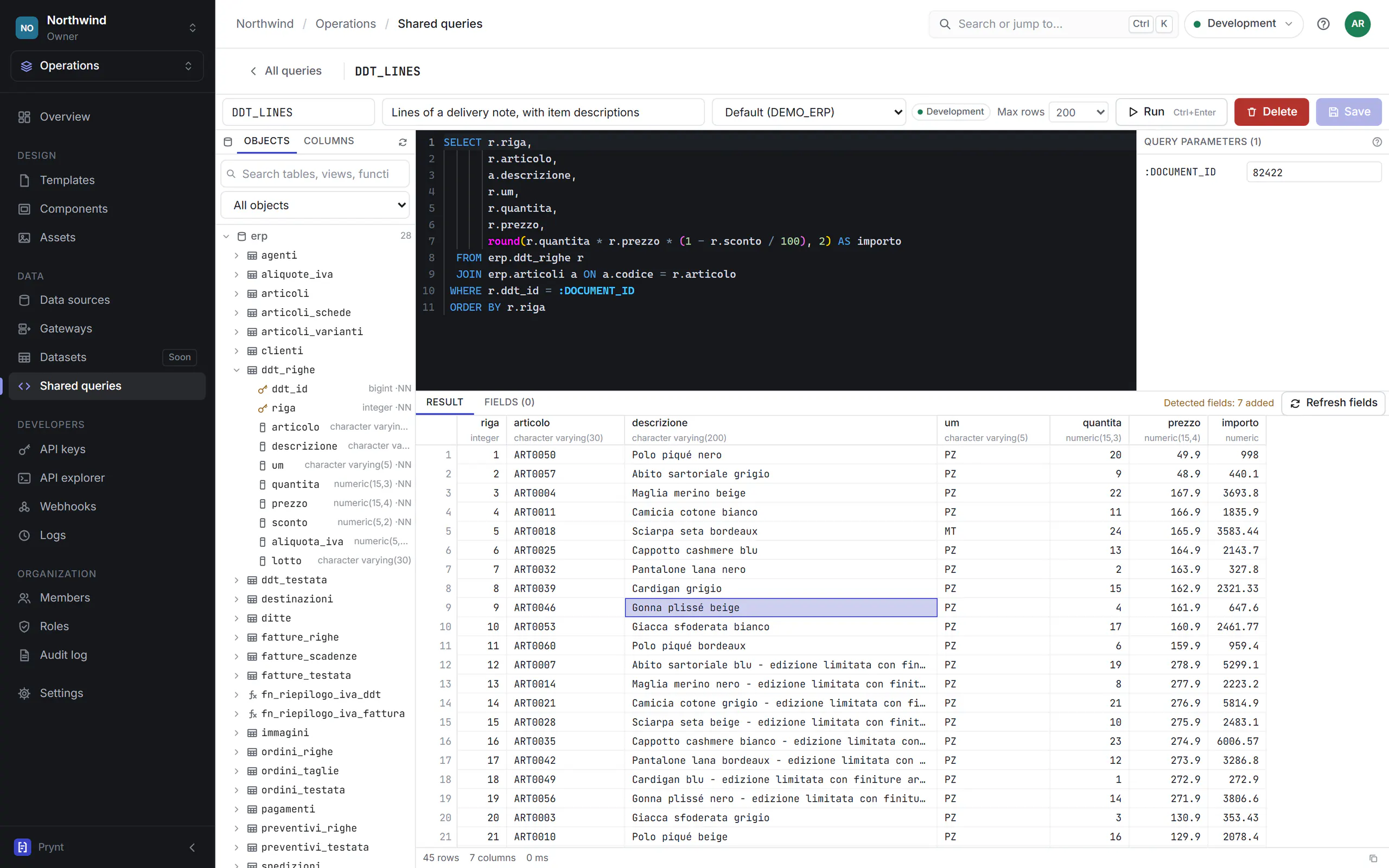
Read-only by design
Prynt never writes to your databases. Every query is protected twice:
- Before it runs, a check for the dialect accepts a single statement starting with
SELECT,WITH,VALUESorTABLE, and rejectsINSERT,UPDATE,DELETE,MERGE,TRUNCATE,INTO,FOR UPDATEand multiple statements, even inside a CTE. On Oracle, PL/SQL declared in the query (WITH FUNCTION) is rejected too. The check runs when you save and publish (SQL_NOT_READ_ONLY), and again before every execution, also on the Gateway. - While it runs, the query is in a read-only transaction (
SET TRANSACTION READ ONLY) that is always rolled back. A routine that tries to write or commit fails.
Use a read-only database user as well
Bind variables and parameters
Each :NAME in the SQL receives a value, always as a typed bind variable: values are never concatenated into the SQL text, so they cannot change the query. In order, a bind takes its value from:
- an explicit binding of the dataset (Query parameters section): a template parameter, a system value or a constant;
- the template parameter with the same name:
:DOCUMENT_IDreads the parameterDOCUMENT_ID; - the system value with the same name:
DITTA(the company of the request context),USER,LANGUAGE,DATE,NOW.
A bind that matches nothing is an error when you save (BIND_UNRESOLVED); Create parameter adds the missing template parameter in one click. A null value is bound as a typed NULL, so optional filters such as (:CUSTOMER IS NULL OR c.CODE = :CUSTOMER) work. More in Parameters.
Fields and types
Fields are the columns of the result. Run the query, then Refresh fields writes them into the dataset with their type: names are upper case (duplicates become CODE_2), and expressions use them as DATASET.FIELD. The fields are what you drag onto the page, and what the checks use to report unknown names.
stringtext- Text columns, also CLOB and long text.
integernumber- Integer columns (on Oracle NUMBER(p,0) up to 18 digits).
decimalnumber- Other numeric columns, exact decimals.
datedate- Dates without a time (PostgreSQL date).
dateTimedate and time- Timestamps; an Oracle DATE is always a date and time.
booleanyes/no- Boolean columns.
binarybytes- BLOB, bytea, RAW: images from a field.
A field used by the layout but missing from the result makes the render fail with the list of available columns.
One record or many
- 1 record (header, customer, company): the first row is used, and its fields can be used anywhere in the template.
- N records (lines, sizes, payments): the rows are iterated by a table or a data region, which may also filter, sort and group them. A field of an N-records dataset used outside its table or region prints the first row, with a warning.
Several datasets and relations
For master–detail documents (orders → lines → sizes), define a relation in the Relations panel: a name, the parent dataset, the child dataset and one or more pairs of key fields that must all be equal. A table or data region nested in the parent's region then shows only the child rows of the current parent record, and totals such as sum(SIZES.QTY) follow the relation. Relations are resolved in memory by the engine: each dataset runs once, not once per parent row.
Datasets on different data sources
Datasets of one template can read different data sources. Each data source is read in its own snapshot, so consistency holds only among datasets of the same data source (the Designer warns with DATA_SOURCE_MULTIPLE).
Testing a dataset
- Run (Ctrl+Enter) executes the query in the environment chosen at the top of the application, with the test values of the parameters, and shows the rows with their types, the time and a warning when it stopped at the maximum number of rows (50, 200 by default, 1,000 or 10,000).
- Database errors are marked at their line and column in the SQL editor; on Oracle you see the ORA- code.
- The Preview (F5) renders the whole document with the same test values: the real PDF, from the real data.
Running queries and editing them needs the sql.execute permission (developers, admins, owner); designers see queries but cannot run or change them.
Limits and timeouts
Rows per dataset200,000- In a render through the API. Previews in the Designer: 50,000. Beyond the limit the render fails (it is never silently truncated).
Data per render256 MB- All the datasets of one document together.
Query timeout30 s- Default of a dataset; up to 3,600 s in renders, 60 s in Designer previews.
Dataset test10,000 rows- Maximum rows of Run in the dataset editor (200 by default).
Gatewaylocal limits- A gateway may apply stricter limits of its own (rows, bytes, timeout).
A dataset that fails or exceeds a limit makes the render fail with DATASET_FAILED. Filter in the query (WHERE) rather than in the layout: it reads less data.
Datasets in the API
POST /v1/datasets/{template}/{dataset}/execute returns the rows of a dataset of a published template as JSON, with your parameters: useful to show a document's data in your application. The SQL is never exposed and the API never accepts SQL. See the API reference.